Set this up once. Everything after it just works.
Every Unusual Whales API project needs the same three things: a folder, a file holding your key, and Claude able to see both. It takes about five minutes, you write no code, and you never do it again.
If words like .env have put you off before, this page is for you. Nothing here assumes you have done it.
UnusualWhales/
├── .env          your key
├── .gitignore    never upload .env
└── README.md     what this is for
Two files, explained once.
These are the two things that trip people up, and neither is complicated. Both are plain text files you can open and read. Claude will create one of them for you, and you will create the other.
A plain text file holding one line: your API key. The dot at the front of the name means your computer usually hides it, which is the point.
Keeping the key in its own file means every project can read it, but the key is never written inside the project itself. You can send someone your whole project and the key stays behind.
A list of files that should never be uploaded anywhere. Ours contains one line: .env.
You may never use GitHub, and that is fine. But the day you ask an assistant to “put this project online”, this one line is what stops your key going public with it. It costs nothing to have and it is the single most common way keys leak.
Four steps, about five minutes.
You will paste two things into Claude and one command into Terminal. Nothing gets installed, and nothing here is permanent except the folder.
- Time
- About 5 minutesOnce, ever
- You need
- Claude and an accountDesktop app
- You write
- No codeTwo pastes and one command
- 1
Get your API key
once, everOpen your API dashboard and copy the key. Leave the tab open, you will need it in a moment. If you do not have one yet, the 7 day free trial gives you a key immediately.
Open my API dashboardTreat the key like a password. Anyone who has it can spend your account's data allowance. You can replace it at any time from the same page.
- 2
Make the folder, then give Claude access to it
In Finder on a Mac, or File Explorer on Windows, make a new folder called UnusualWhales. Put it somewhere you will find again. Your Desktop or Documents is fine.
One word, no space. A space has to be quoted in every command that touches the folder, and that is a common source of confusing errors later. Make it by hand rather than asking Claude to: you need to be able to find it again in a minute.
Now point Claude at it. Claude can only read and write where you let it.
Claude desktop appStart a new chat. Underneath the message box, click Project or folder, then pick the folder you just made.
Claude CodeOpen Terminal, type
cdand a space, then drag your UnusualWhales folder into the window. Press Enter, then typeclaude.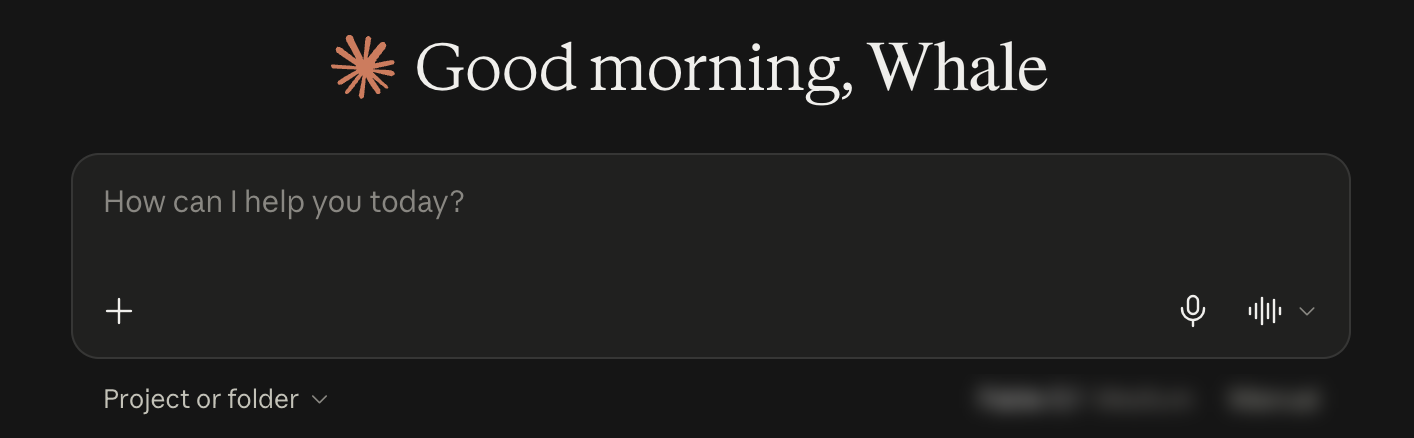
Project or folder, directly below the message box. Some versions of Claude also show a Chat / Cowork toggle in this spot. If yours does, set it to Cowork first. An ordinary chat cannot open your files.
- 3
Let Claude set up the folder
Paste this. Notice what it does not do: it tells Claude not to ask for your key. You will add that yourself in the next step, and the reason is below.
Paste into ClaudeSet this folder up for Unusual Whales API projects. Create a .gitignore containing one line, .env, so my key can never be uploaded by accident. Create a short README.md saying what this folder is for. Do not create a .env and do not ask me for my API key, I will add that myself. Then tell me what you created.
- 4
Add your key yourself
This is the one step Claude does not do for you, and the next section explains why. It asks for your key, then writes it straight to disk.
macOS and Linux: open Terminal. Type
cdfollowed by a space, then drag your UnusualWhales folder from Finder into the window. The folder's location fills itself in. Press Enter, then paste the command below.If you used Claude Code in step 2, your terminal is already in the folder, so go straight to the paste.
macOS / Linux$ printf 'Paste your Unusual Whales API key: ' \ && read -rs K && echo \ && printf 'UW_API_KEY=%s\n' "$K" > .env \ && chmod 600 .env && unset K \ && echo 'Saved to .env. Nothing was printed and nothing was saved to your history.'The drag saves you typing a path and works wherever the folder is. If you see
no such file or directory, thecddid not land in the right place. Try the drag again.Windows: in File Explorer, right-click your UnusualWhales folder and choose “Open in Terminal”. On Windows 10, hold Shift while you right-click and choose “Open PowerShell window here”. That opens a window already pointed at the folder. Then paste the block below.
Windows PowerShellPS> $sec = Read-Host "Paste your Unusual Whales API key" -AsSecureString PS> $K = [System.Net.NetworkCredential]::new('', $sec).Password.Trim() PS> "UW_API_KEY=$K" | Set-Content -Encoding ascii .env PS> Remove-Variable K, sec PS> "Saved to .env."
Windows has no direct equivalent of the file-locking the macOS command does, so your
.envinherits whatever permissions the folder has. Keep the folder somewhere only you can reach, such as under your own user directory.Then paste this back into Claude to confirm it all worked:
Paste into ClaudeCheck my setup without printing my key or any part of it: does .env exist, does UW_API_KEY have a value in it, and does .gitignore list .env? Answer yes or no for each.
Why you never paste the key into the chat.
Claude could have created that file for you in one step. We deliberately did not, because the only way to do it is for you to type your key into the conversation, and then it lives in that conversation's history for as long as the conversation exists.
The command in step 4 avoids that completely. Your key goes from your clipboard into a file on your own machine. It is never displayed, never saved to your command history, and never sent anywhere. The file is then locked so only your account can read it.
Your folder is ready. Pick a project.
Both of these start from the folder you just made, so you can skip straight to the interesting part.
- Build a positioning dashboardConnect Unusual Whales to Claude, paste one line, and get dealer gamma, dark pool, option flow and volatility on one page.
- Run the earnings volatility scannerPoint your AI assistant at one file and get a scored, auditable pre-earnings volatility screen you can run every afternoon.
All of this runs on an API key, and 7 days are free.
One key, one folder, and every project on this site works from it.
7-day free trial. A credit card is required to start. Cancel any time within the 7 days and you pay nothing; if you don't cancel, it converts to a paid API plan automatically.